Markdown Multilevel Lists Break in Word? Fix Hierarchy, Number Continuation, and Indentation
A multilevel Markdown list can look correct in an editor and still flatten, restart, or continue incorrectly after conversion to Word. Child items may become top-level bullets, a second procedure may continue from the previous number, or a paragraph and code block may detach from the step they explain.
The problem is usually not the visible bullet symbol. It is the underlying relationship between list markers, indentation, blank lines, continuation content, and independent procedures. Word can create editable multilevel lists only when the Markdown structure is unambiguous.
Use stable indentation for every nested level, align continuation paragraphs and code blocks with their parent item, separate independent procedures with headings or prose, keep chapter numbering out of ordinary list syntax, reduce excessive nesting, and verify restart and continuation behavior in the final DOCX.
 Clear parent-child structure helps Word preserve multilevel numbering and indentation.
First identify what the list represents
Different list purposes need different structures. Before changing indentation, decide what the list is meant to communicate.
| Purpose | Recommended structure |
|---|---|
| Sequential procedure | Ordered list |
| Options or observations | Unordered list |
| Parent task with supporting actions | Multilevel list |
| Chapter and section numbers | Heading styles with multilevel numbering |
| Stable requirement IDs | Explicit identifiers or a table |
A list should not be used merely because the source contains numbers. The intended document behavior matters more than the visible prefix.
Use stable indentation for every nested level
A child item must be indented relative to its parent. Inconsistent indentation can flatten the hierarchy or attach an item to the wrong parent.
1. Prepare the release
  - Update dependencies
    - Verify licenses
 - Run tests
2. Deploy
1. Prepare the release
   - Update dependencies
     - Verify licenses
   - Run tests
2. Deploy
Use one indentation convention throughout the document. Avoid relying on tab characters because tab stops can vary between editors and conversion tools.
Keep continuation paragraphs inside the parent item
A numbered step may contain an explanation, warning, quotation, image, formula, or code block. That continuation content must remain structurally inside the item.
1. Validate the source.

This paragraph explains the validation rules.

2. Start conversion.
1. Validate the source.

   This paragraph explains the validation rules.

2. Start conversion.
If the continuation begins at the page margin, the parser may treat it as an ordinary paragraph outside the list. In Word, that can create broken indentation or an apparent gap between the number and its explanation.
 Continuation content should remain structurally attached to the step it explains.
Indent code blocks, images, and quotations that belong to a step
A code block or image that belongs to a numbered instruction should use the same continuation indentation.
1. Install the package.

   ```bash
   npm install
   ```

2. Verify the installation.

   ```bash
   npm --version
   ```
Without indentation, the fenced block may end the list and cause the second numbered item to restart or become a separate sequence.
Separate independent procedures clearly
Word may continue numbering when two lists appear to belong to the same sequence. If the second list is a new procedure, make the separation explicit in the Markdown.
### Preparation

1. Back up the configuration.
2. Stop the service.

### Verification

1. Start the service.
2. Check the health endpoint.
Use one or more of these signals:
- A descriptive heading
- A sentence that introduces the new procedure
- A clear change in purpose
- A separate subsection rather than two adjacent lists
After conversion, confirm whether the second procedure restarted at 1. Word may still need a manual restart when a document combines several imported list definitions.
Do not confuse numbered headings with numbered lists
A chapter heading such as “2. Methods” should not be represented as an ordinary list item. Numbered headings belong to the document outline and table of contents.
| Example | Correct treatment |
|---|---|
| 1. Install the package | Ordered list item |
| 2. Methods | Heading with automatic numbering |
| REQ-2.4 | Stable identifier, not automatic sequence |
Typing chapter numbers directly into heading text can create duplicate numbering when the Word template also enables automatic heading numbers.
Avoid manually typed sequence numbers in ordinary paragraphs
AI drafts sometimes produce numbered-looking paragraphs instead of a real Markdown list.
Step 1: Collect the files.

Step 2: Validate the files.

Step 4: Convert the files.
When the numbers are meant to update as the procedure changes, convert the content to a real ordered list:
1. Collect the files.
2. Validate the files.
3. Convert the files.
Keep fixed numbers only when they are identifiers, contractual references, test-case IDs, or another value that must not change automatically.
Reduce excessive nesting
Deep nesting consumes horizontal space and makes parent-child relationships difficult to follow in Word. Four or five levels may technically convert while remaining poor document design.
Replace deep levels when appropriate:
- Use a heading for a major subtopic.
- Use a table for repeated attributes.
- Split a long procedure into phases.
- Move explanatory detail into continuation paragraphs.
- Keep nested bullets only for genuine child actions or sub-options.
If an item introduces a new topic rather than supporting its parent, it probably needs a heading or separate section.
Review mixed bullet and numbered levels
A numbered parent with bullet children is often appropriate for procedures. A bullet parent with numbered children may be appropriate when each option contains an ordered sequence. The pattern should reflect meaning, not decoration.
1. Prepare the source.
   - Remove duplicate headings.
   - Check local image paths.
2. Convert the document.
   - Select the template.
   - Review conversion options.
Do not alternate bullets and numbers merely to make levels look different. Word list styling already provides visual distinction.
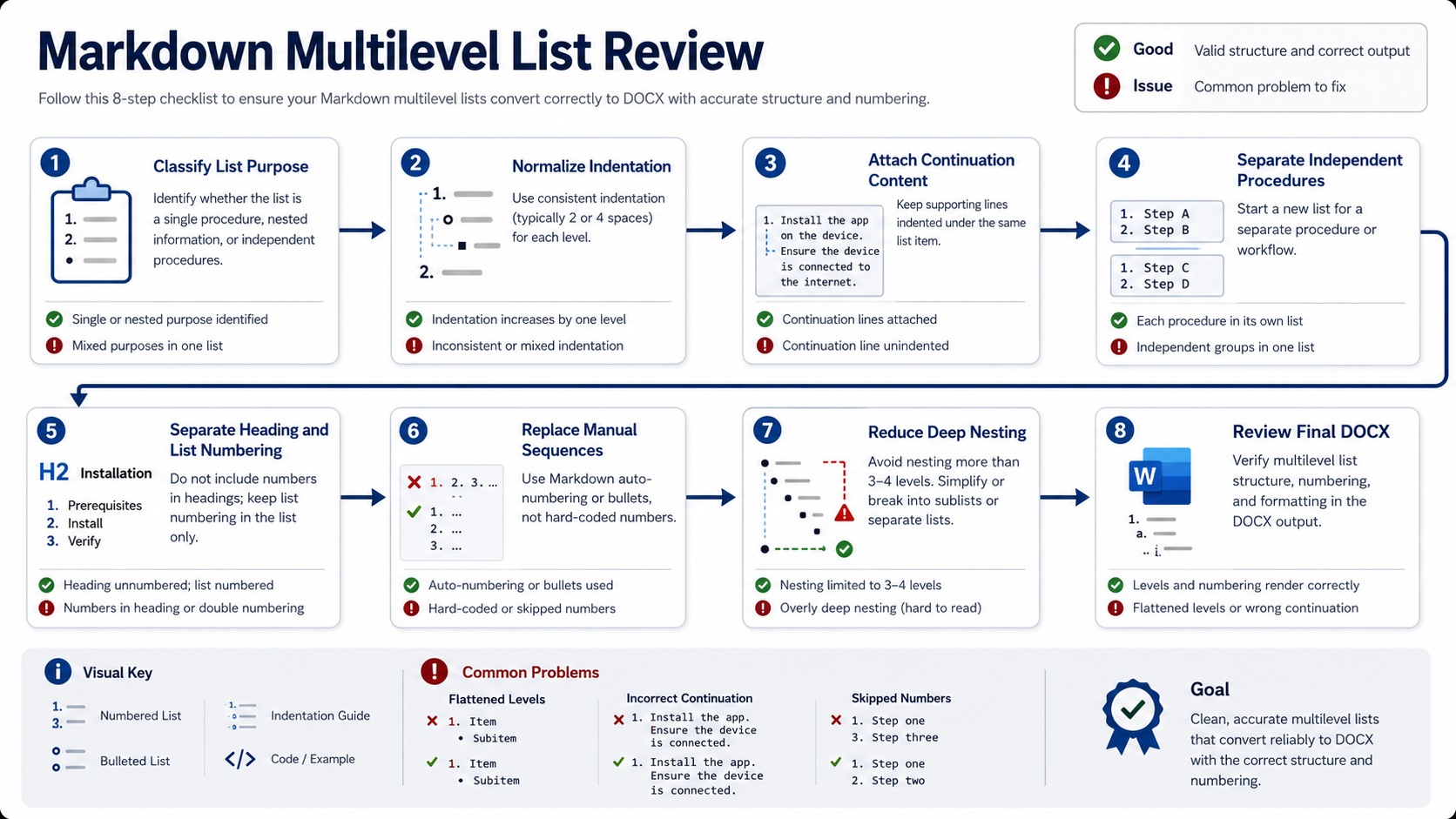
A practical multilevel-list cleanup workflow
- Classify each list. Identify procedure, options, hierarchy, or fixed identifiers.
- Normalize indentation. Apply one stable rule to every nested level.
- Attach continuation content. Indent paragraphs, code, images, and quotations under the correct item.
- Separate independent procedures. Add headings or explanatory text.
- Separate heading numbering from list numbering.
- Replace manually typed sequences. Keep fixed IDs only when intentional.
- Reduce deep nesting. Use headings, tables, or phases where clearer.
- Convert and review the DOCX. Check restart, continuation, indentation, and page breaks.
 Clarify list purpose and structure before adjusting the visual Word list style.
Review the final DOCX
- Each child item appears under the intended parent.
- Independent procedures restart or continue as intended.
- Continuation paragraphs remain inside their numbered item.
- Code blocks, images, and quotations align with the correct step.
- Heading numbers do not duplicate typed prefixes.
- Fixed identifiers have not been converted into automatic numbering.
- Deep levels remain readable within the page width.
- Page breaks do not separate a number or bullet from its content.
Frequently asked questions
Why did my nested list become one flat list in Word?
The child items may use inconsistent indentation, or an unindented paragraph or block may have ended the parent list.
Why did a new numbered procedure continue from the previous number?
The source may not clearly separate the procedures, or Word may have reused the same list definition. Add a heading or introductory paragraph and verify the restart setting.
Should numbered headings be written as a Markdown list?
No. Use heading syntax for chapters and sections, then apply multilevel numbering to heading styles in Word.
How many nested levels should a report use?
Use only the levels required by genuine parent-child relationships. When readers must track more than three levels repeatedly, headings or separate procedures are often clearer.
Final checklist
- Every list has a defined purpose.
- Nested levels use stable indentation.
- Continuation content stays with its parent item.
- Independent procedures are clearly separated.
- Heading numbering is separate from ordinary list numbering.
- Fixed identifiers remain fixed.
- Excessive nesting has been simplified.
- The final DOCX restart and indentation behavior has been reviewed.
A note about the PDF handoff
DOCX remains useful while heading levels, numbering, or section breaks are being edited. When the hierarchy and pagination are ready, PDF gives readers a stable visual copy. Review the exported pages for heading placement, number continuation, and unexpected blank space in the target viewer.