Primary navigation
English

Professional Word Templates for Markdown

Choose Clean Office, Academic, Business Report, or Technical Documentation according to the document you are creating.

Word template system

Four templates for different types of documents

Each template is tuned for typography, spacing, headings, captions, code blocks, table layout, and long-form document structure.

Clean Office A balanced Word style for everyday documents, meeting notes, AI drafts, internal summaries, SOPs, checklists, and lightweight reports. Best for notes, outlines, checklists, callouts, short reports, and mixed Chinese-English business writing. Readable heading rhythm Compact tables and lists General office spacing Compact headers, page numbers, and office tables Template details
Academic A formal long-document template for research notes, literature reviews, formulas, footnotes, references, tables, block quotes, and structured drafts. Best for papers, course reports, research memos, formulas, footnotes, references, and long structured documents. Long-form hierarchy Formula-friendly spacing Footnote and reference flow Serif typography, abstract, equation, and bibliography styles Template details
Business Report A report template for executive summaries, KPI tables, timelines, SWOT analysis, risk matrices, decisions, charts, and customer documents. Best for consulting reports, market analysis, project reviews, KPI dashboards, strategy notes, and customer-facing documents. Executive summary layout KPI and risk sections Review and approval sections Executive cover, landscape analysis, signature, and approval sections Template details
Technical Documentation A structured documentation template for API blocks, code examples, command snippets, config blocks, file trees, Mermaid diagrams, release notes, and implementation notes. Best for API docs, README files, technical specs, implementation plans, release notes, and engineering handoff documents. Code-first layout Diagram and file tree support Precise technical blocks Monospace metadata, line numbers, change logs, and dense specifications Template details

Template details

How each template turns Markdown into a deliverable Word document

Templates are not just colors. They decide the reading rhythm, table density, caption style, code presentation, and whether the document feels like a memo, a paper, a client report, or technical documentation.

Clean Office

A balanced Word style for everyday documents, meeting notes, AI drafts, internal summaries, SOPs, checklists, and lightweight reports.

Best-fit scenarios
  • Meeting notes and SOPs
  • AI-generated outlines
  • Internal knowledge docs
Document elements
  • Headings
  • Lists
  • Callouts
  • Tables
  • Images
  • Definition lists
  • Page breaks
  • Signatures
Template strengths
  • Readable heading rhythm
  • Compact tables and lists
  • General office spacing
  • Compact headers, page numbers, and office tables

Best for notes, outlines, checklists, callouts, short reports, and mixed Chinese-English business writing.

Academic

A formal long-document template for research notes, literature reviews, formulas, footnotes, references, tables, block quotes, and structured drafts.

Best-fit scenarios
  • Literature reviews
  • Course papers
  • Research reports
Document elements
  • Math formulas
  • Footnotes
  • References
  • Quotes
  • Tables
  • Abstract and keywords
  • Equation numbering
  • Cross-references
  • Glossary and index
Template strengths
  • Long-form hierarchy
  • Formula-friendly spacing
  • Footnote and reference flow
  • Serif typography, abstract, equation, and bibliography styles

Best for papers, course reports, research memos, formulas, footnotes, references, and long structured documents.

Business Report

A report template for executive summaries, KPI tables, timelines, SWOT analysis, risk matrices, decisions, charts, and customer documents.

Best-fit scenarios
  • Quarterly business reports
  • Market research summaries
  • Project delivery documents
Document elements
  • KPI
  • Timeline
  • Risk matrix
  • SWOT
  • Decision record
  • Executive summary
  • Landscape sections
  • Approval area
Template strengths
  • Executive summary layout
  • KPI and risk sections
  • Review and approval sections
  • Executive cover, landscape analysis, signature, and approval sections

Best for consulting reports, market analysis, project reviews, KPI dashboards, strategy notes, and customer-facing documents.

Technical Documentation

A structured documentation template for API blocks, code examples, command snippets, config blocks, file trees, Mermaid diagrams, release notes, and implementation notes.

Best-fit scenarios
  • API documentation
  • Implementation plans
  • Engineering handoff docs
Document elements
  • API
  • Code blocks
  • Commands
  • Config
  • File tree
  • Mermaid
  • Diff
  • Terminal and logs
  • Filenames and line numbers
  • Version records
Template strengths
  • Code-first layout
  • Diagram and file tree support
  • Precise technical blocks
  • Monospace metadata, line numbers, change logs, and dense specifications

Best for API docs, README files, technical specs, implementation plans, release notes, and engineering handoff documents.

Verified DOCX output

See real document output before you choose a template

These four reviewed template outputs use the same non-sensitive Markdown source. Full-page screenshots and review notes show headings, tables, formulas, citations, Mermaid diagrams, images, technical blocks, and captions before you choose a template.

Source Non-sensitive acceptance Markdown Render DocuCraftBox v1.8.0 Inspected WPS Office Desktop, 2026-07-18 Format Editable DOCX (Office Open XML)

Markdown input used for every sample

---
title: Professional Markdown Acceptance Sample
---

## Tables and captions
| Feature | Supported | Notes |
| --- | ---: | --- |
| Formulas | Yes | $E = mc^2$ |

```mermaid
flowchart TD
  Markdown --> DOCX
```

Research result [@source].

What the generated DOCX demonstrates

  • Native heading levels, lists, and document navigation.
  • Editable tables with captions, borders, and numeric alignment.
  • Word math, references, rendered Mermaid diagrams, and embedded images.
  • Template-specific styles for notes, report blocks, and technical content.
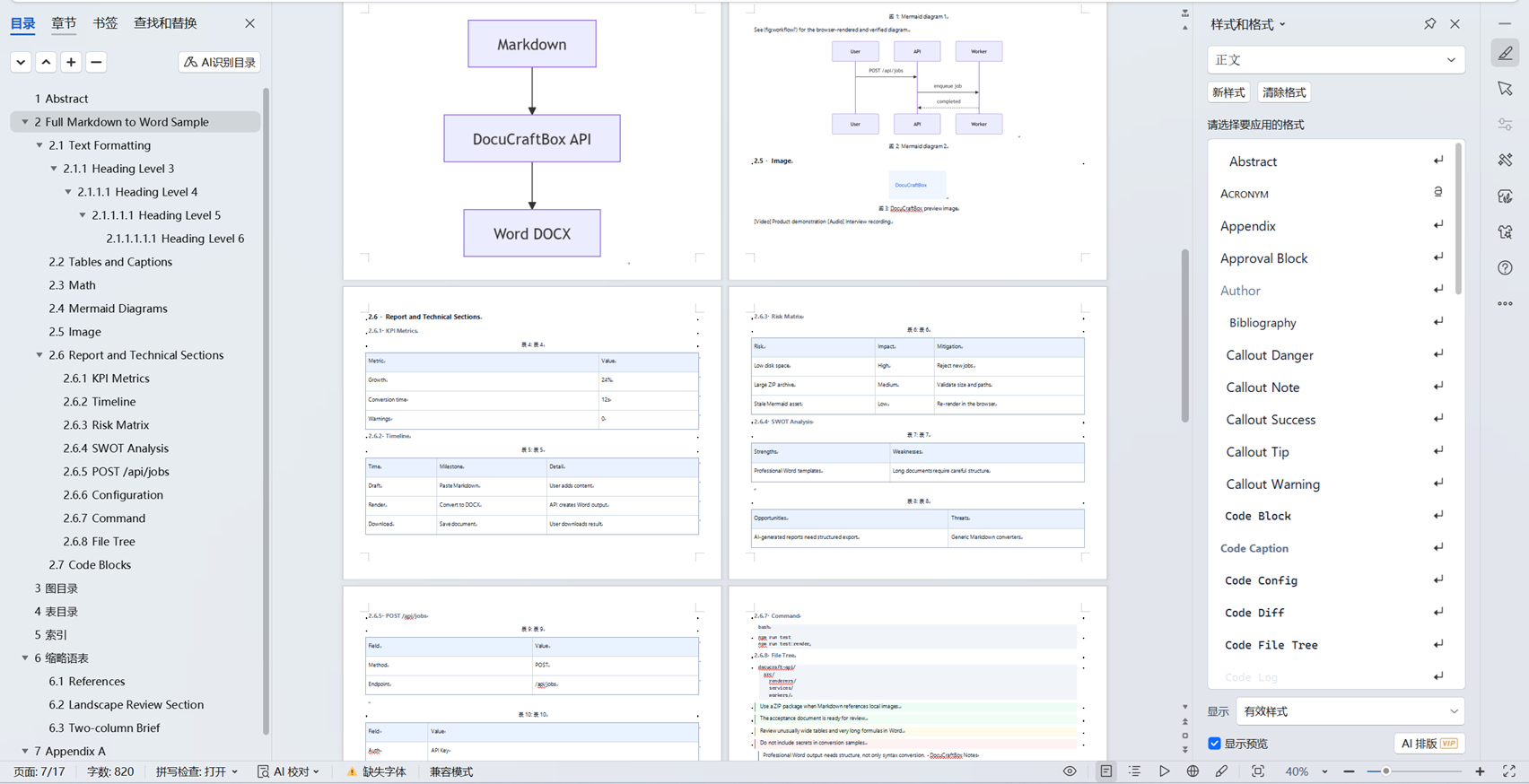
Clean Office DOCX output inspected in WPS Office

Clean Office

Best for notes, outlines, checklists, callouts, short reports, and mixed Chinese-English business writing.

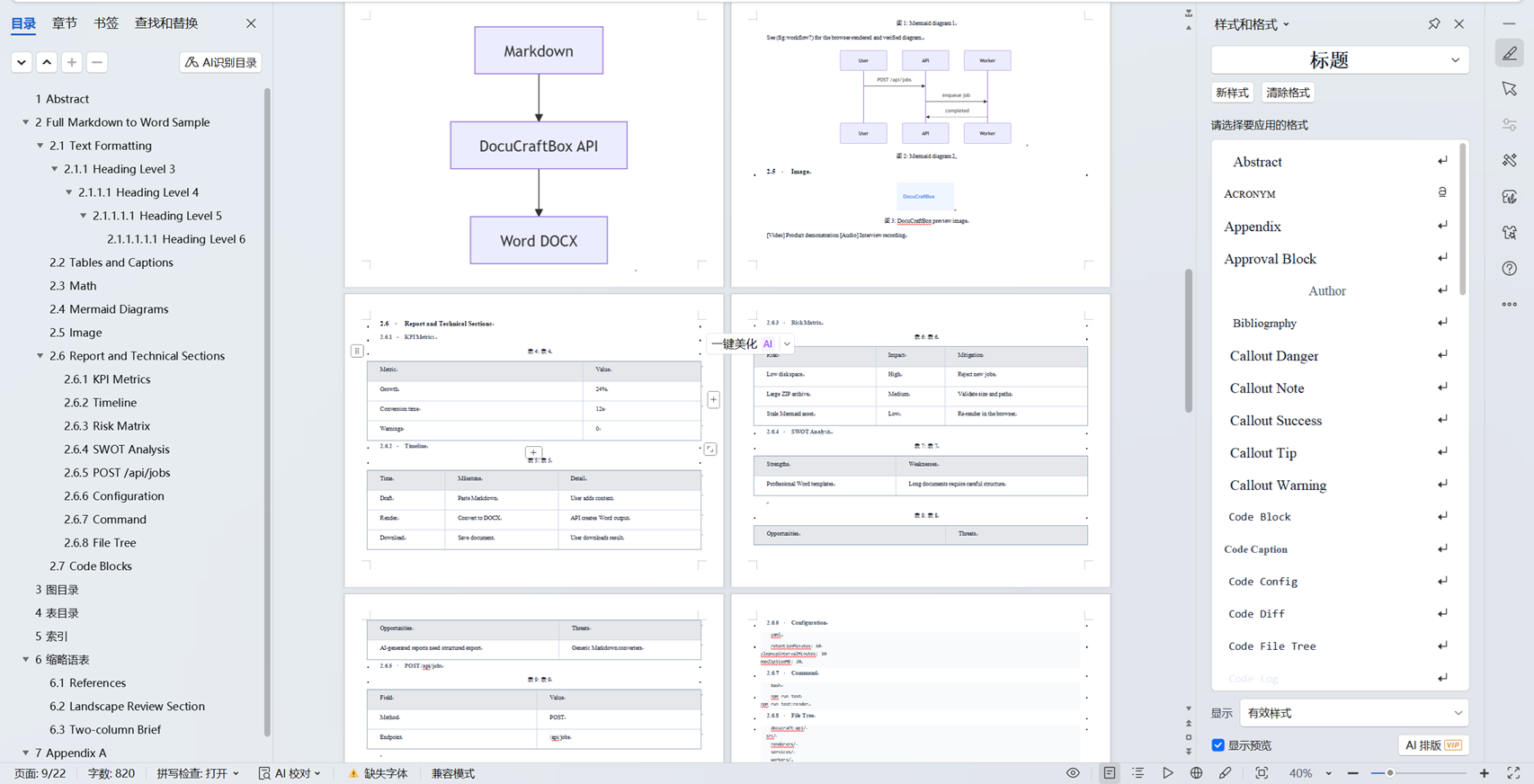
Academic DOCX output inspected in WPS Office

Academic

Best for papers, course reports, research memos, formulas, footnotes, references, and long structured documents.

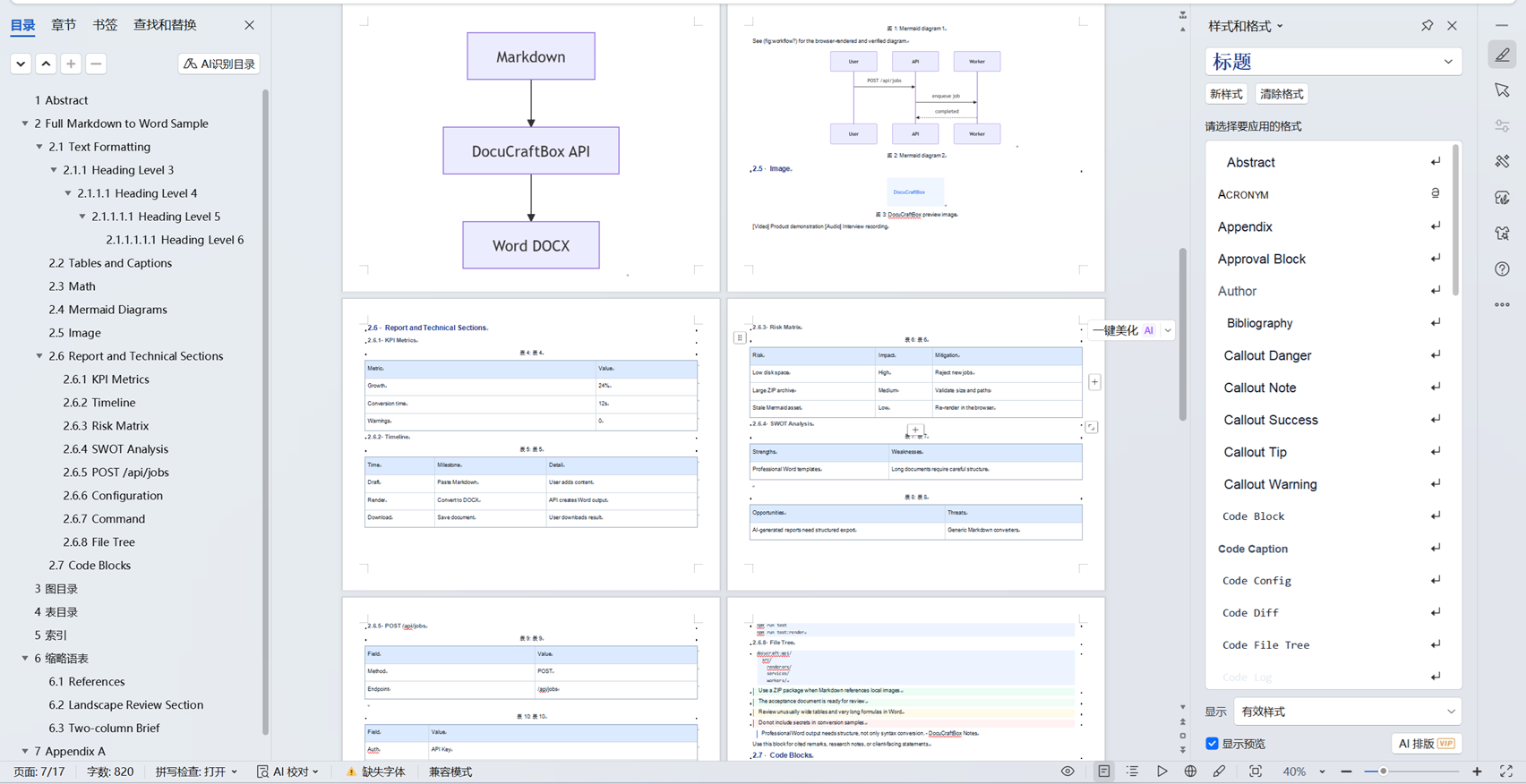
Business Report DOCX output inspected in WPS Office

Business Report

Best for consulting reports, market analysis, project reviews, KPI dashboards, strategy notes, and customer-facing documents.

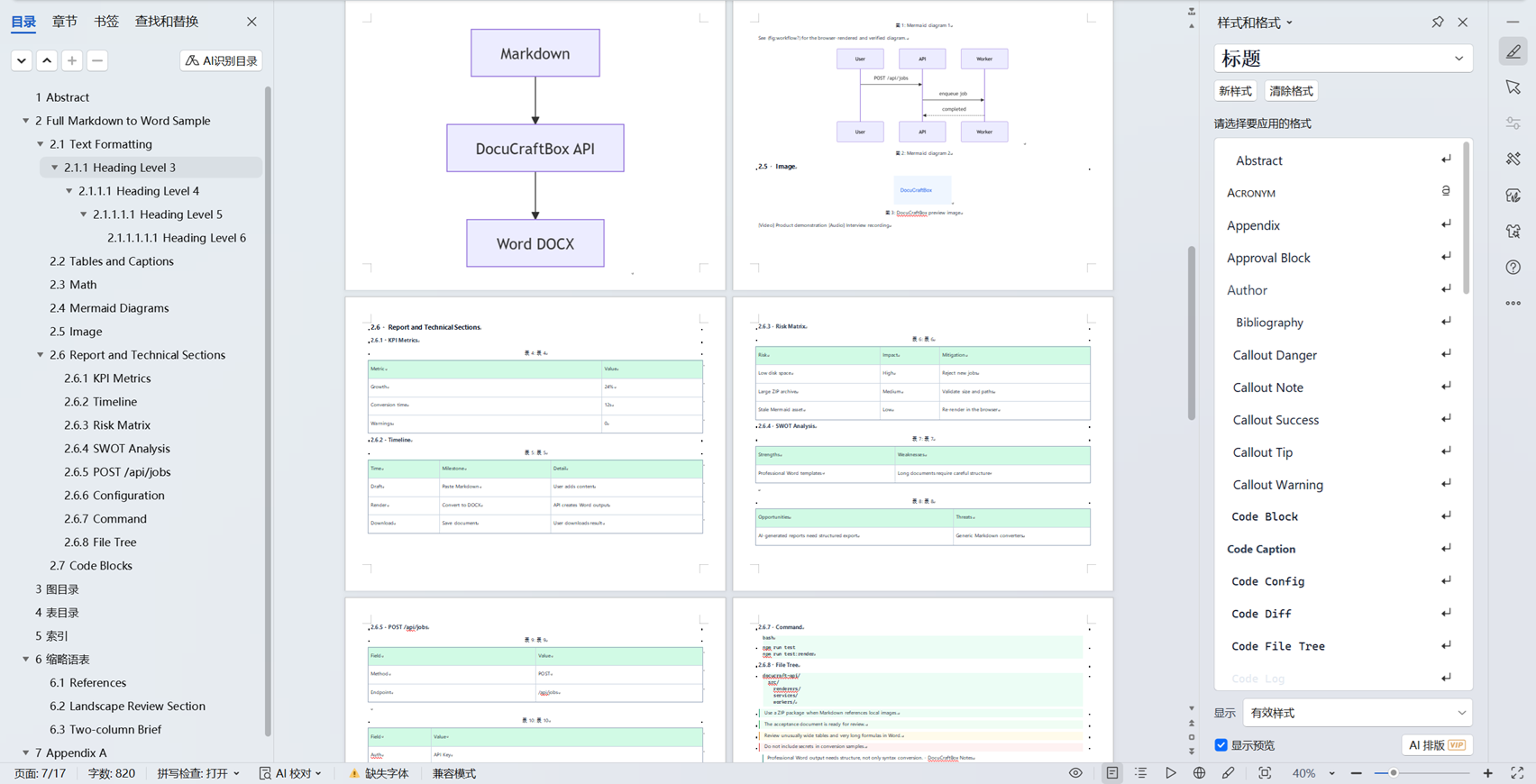
Technical Documentation DOCX output inspected in WPS Office

Technical Documentation

Best for API docs, README files, technical specs, implementation plans, release notes, and engineering handoff documents.

The screenshots were inspected in WPS Office Desktop on 2026-07-18. DOCX rendering can vary with installed fonts, the recipient editor, and unusually complex content; review final delivery files in the editor used by the recipient.

Create a professional Word document from Markdown

Convert templates, callouts, formulas, tables, diagrams, captions, KPI sections, timelines, and technical content into one editable DOCX.

Start Converting